
↓
 
Header image for PolyWogg.ca mobile view

PolyWogg.ca

The writing life of a tadpole

PolyWogg Astronomy - my adventures hopping from star to star
 
 
  • Welcome
  • Writing and Publishing
    • List of blog posts about Publishing
    • List of blog posts about Writing
    • List of blog posts about #Bouchercon2025
  • HR Materials
    • My HR Guide
    • List of blog posts about HR
    • PS Transitions FP (EN)
  • Astronomy
    • My Astronomy Guide
    • List of blog posts about Astronomy
  • About Me
    • About PolyWogg.ca
    • Privacy Policy
    • Subscribe
    • Contact Me
    • PolySites
      • PolyWogg.ca (Home)
      • ThePolyBlog
      • AstroPontiac.ca

Tag Archives: options

Picture of a boy looking through a telescope to represent astronomy

So what exactly did I want in an observatory?

PolyWogg.ca
May 5 2020

A few people have asked, quite surprisingly to me, what kind of observatory I was “letting go” from my long-term goals. Most plebes think an observatory is simply a place to put your scope and observe the sky, and while they are not completely wrong, it is much more complicated than a simple “location-based” definition.

So, let’s start with what I have as a scope:
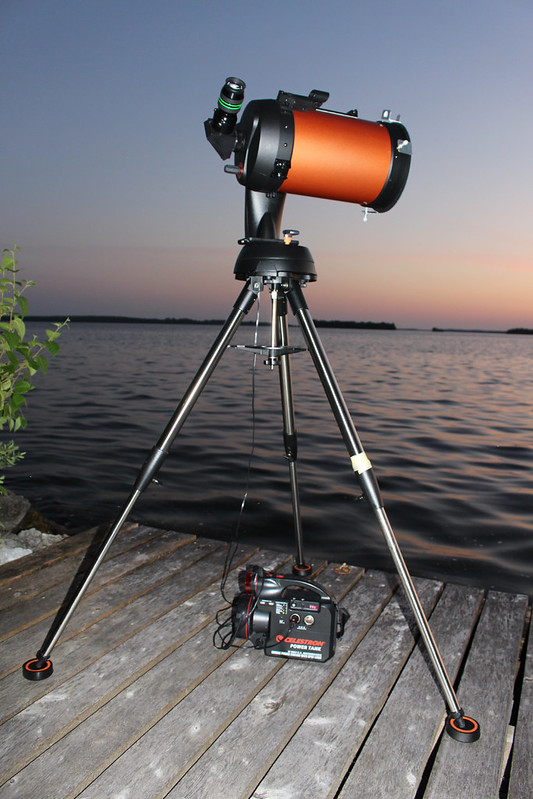
Celestron NexStar 8SE

That set-up is made up of nine things:

  1. A physical site:
    1. A location to do the viewing, preferably with dark skies (this picture is taken at the inlaws’ cottage in front of a lake and big open skies to the west);
    2. A flat platform for the equipment all to rest upon, along with vibration suppression pads under the tripod legs; and,
    3. Some sort of limited area around the space;
  2. Observing mechanics:
    1. An optical tube — the orange part, which is a Schmidt-Cassegrain telescope (SCT) design;
    2. A mount — the small black base with a computer in it and an arm that rises up from just below the tube to attach at the far side of the scope; and,
    3. A tripod — the silver part, with the three legs fully extended;
  3. Accessories:
    1. An eyepiece (black with green banding at the top back of the scope);
    2. A power source, which is a portable power tank (this model is very similar to a car battery); and,
    3. A place to hold accessories, which is a flat area just below the black mount, very hard to see in the photo although there is also a table out of range of the camera;

For most observing, the parts are inter-related.… Read the rest

Posted in Astronomy Guide | Tagged depression, dreams, observatory, options, telescope | Leave a reply
Picture of a boy looking through a telescope to represent astronomy

Best accessories for the Celestron Nexstar 8SE

PolyWogg.ca
October 23 2017

A new owner of an older 8SE asked me what I thought were the priority accessories to get to go with the stock package (mount, OTA, and 25 mm Plossl). I thought it would be an easy answer, and then realized it is almost as difficult to answer as what scope would be best for someone. But I did respond and thought I could maybe turn it into a post too. Obviously it all depends on what they want to look at the most and from where. Maybe even with whom. Nevertheless, here are my thoughts on some extra considerations.

A. A good power source. I have the Celestron Lithium-Ion tank, which seems to work well for me, but I wouldn’t necessarily want to use it for a 12-hour viewing excursion. I have two old Powertanks and I may try to revive them to just use as a backup.

B. Tools to help with levelling. A simple bubble level, or apps like Cliniometer for an Android phone. I need it to make sure the scope is level before trying to align.

C. A tool to help with GPS. If you know where you are going beforehand, Google Maps will give you the coordinates.… Read the rest

Posted in Astronomy Guide | Tagged 8SE, accessories, astronomy, Celestron, NexStar, options, viewing | 5 Replies
Picture of a boy looking through a telescope to represent astronomy

Best alignment process for the Celestron NexStar 8SE

PolyWogg.ca
October 22 2017

I’ve blogged about my challenges and successes (Finally learning with the Celestron NexStar 8SE and Solving alignment problems with the Celestron NexStar 8SE), so I thought I would do a quick summary of the proper way to align my scope in case it helps others.

Here are my “four” options, although the first two are obviously tongue-in-cheek:

A. Give up

Either get a different scope or take up knitting…I actually thought about both.

B. Do it wrong for five years

Or until two people help you figure out why it’s not working (see above two posts).

C. Regular Auto Two-Star alignment – Short version

I’ll give the full write-up below with all the bells and whistles, but this will just be the short process steps.

  1. Setup tripod;
  2. ** If you are using a wedge, add wedge plate underneath;
  3. ** If you are using vibration suppression pads, set them under the legs;
  4. Add mount/arm;
  5. Attach Optical Tube Assembly (OTA), and then retighten the supporting plate on the tripod with the new weight on it;
  6. Plug in the power source;.
  7. Turn on scope, lower tube to a horizontal position, turn off scope;
  8. Level the scope;
  9. Turn on scope;
  10. Align spotter scope or TelRad or red-dot finder;
  11. Press enter to start alignment;
  12. Change to AUTO TWO-STAR;
  13. Hit BACK/UNDO to go back to CUSTOM SITE, enter GPS COORDINATES;
  14. Enter time, date, DAYLIGHT SAVINGS TIME or not, and timezone;
  15. Choose a star from the formal list, centre it roughly in the eyepiece, press ENTER, fine-tune your centring (Up and Right as last movements) by eyeball, reticule or doughnut methods, press Align;
  16. If you used the doughnut method, refocus to a tight star point view;
  17. Choose Star 2, let it slew to near that spot, centre star roughly in eyepiece, press ENTER, fine-tune alignment (Up and Right again) by eyeball, reticule, doughnut methods, press Align;
  18. Wait for “Alignment Success” message;
  19. Test your alignment on the two alignment stars you used;
  20. Turn off your TelRad or another device;
  21. Start looking for new objects!
… Read the rest
Posted in Astronomy Guide | Tagged 8SE, alignment, astronomy, Celestron, errors, NexStar, options, viewing | 12 Replies
Picture of a boy looking through a telescope to represent astronomy

Finally learning with the Celestron NexStar 8SE

PolyWogg.ca
June 14 2015

I have a Celestron NexStar 8SE telescope…for those not in the know, that’s an 8″ optical tube on a simple tripod. They call them one-armed bandits (like the slot machines) because there is a single arm that goes from the tripod mount that it rests on up to the tube. Simple, easy to work, but it isn’t very stable, at least not in astronomical viewing terms. It doesn’t allow for much in the way of astro photography due to its limited ability to track the sky over time, thus limiting the photography options of long-exposures. However, there is one feature where the 8SE shines — it’s ease of use.

This was a key ingredient for me in buying a scope, based on knowledge of who I am and the patience I have. If a scope takes 30 minutes to setup, I’m not likely to use it. I need something relatively simple, and the 8SE requires you to basically setup the tripod, attach the scope to the arm, add some power and eyepieces, and you’re good to go. More or less.

The second feature that was a huge selling feature for me is what they call the “go to” feature. You run a simple alignment procedure on the scope, the computer on the mount figures out what stars you are looking at, and after that, it knows where all the other stars and planets should be.… Read the rest

Posted in Astronomy Guide | Tagged alignment, astronomy, options, Ottawa, RASC, star party, viewing | Leave a reply
© 1996-2025 - PolyWogg Privacy Policy
↑